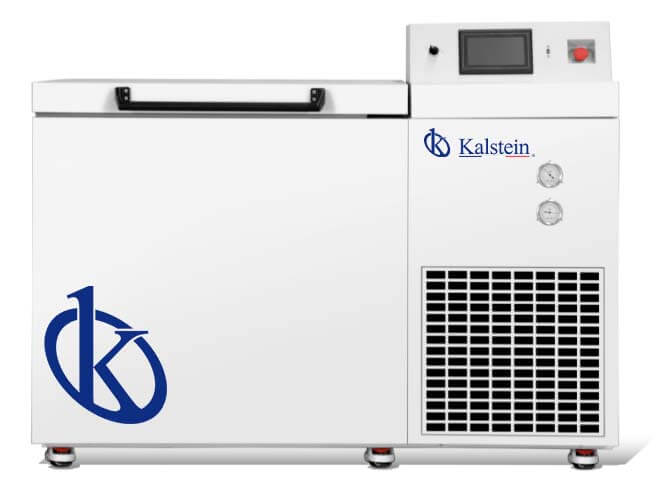
Troubleshooting Common Errors on the YR05319 Cryogenic Freezer
The YR05319 Cryogenic Touch Screen Chest Freezer is a specialized unit designed for the long-term storage of biological materials, including viruses, germs, red blood cells, white blood cells, and tissues. Understanding how to troubleshoot common errors is crucial for maintaining the freezer’s optimal operating conditions, especially in critical environments like blood banks, hospitals, and research laboratories.
Technical Specifications of the YR05319
| Specification | Detail |
|---|---|
| Model | YR05319 |
| Capacity | 128L |
| Operating Temperature Range | -40℃ to -150℃ |
| Cooling Method | HC Non-flammable Refrigerant |
| Alarm Features | High/Low Temperature, Sensor Error |
| Screen Type | 7-inch Touch Screen |
| Data Logging | USB Port for Downloading Data |
| Emergency Stop | Yes |
Troubleshooting by Symptom
This section provides a structured approach to diagnosing issues based on specific symptoms that the YR05319 may exhibit during operation.
Equipment Does Not Power On
When the YR05319 fails to power on, several potential causes may need to be investigated:
- Check if the power cord is securely plugged into the outlet.
- Inspect the circuit breaker for any tripped circuits.
- Examine the power outlet for functionality using a multimeter.
Diagnosis Steps:
- Inspect the power switch and ensure it is in the ON position.
- Verify the integrity of the power cord for any signs of damage.
- Try connecting the unit to a different outlet.
Solutions:
- Replace the power cord if damaged.
- Reset the circuit breaker if tripped.
Error Code E-03: Sensor Error
The E-03 error code indicates a problem with the temperature sensor. This can lead to inaccurate temperature readings and is critical to address promptly.
Diagnosis Steps:
- Check the connections of the sensor to the control board.
- Inspect the sensor for any signs of physical damage.
Solutions:
- Reconnect or replace the faulty sensor if necessary.
- Recalibrate the temperature reading following sensor replacement.
Inconsistent Temperature Readings
Inconsistent readings can compromise the safety of stored biosamples. This may be caused by several factors:
- Dirty or obstructed air vents.
- Faulty temperature probe.
Diagnosis Steps:
- Examine the air vents for any obstructions.
- Check the functionality of the temperature probe using calibration tools.
Solutions:
- Clean air vents and ensure proper airflow.
- Replace the temperature probe if it is faulty.
Symptom-Cause-Solution Matrix
| Symptom | Probable Cause | Solution |
|---|---|---|
| Equipment Does Not Power On | Power cord issue, circuit breaker tripped | Secure connections, replace cord |
| Error Code E-03 | Sensor malfunction | Reconnect or replace sensor |
| Inconsistent Temperature Readings | Dirty vents, faulty probe | Clean vents, replace probe |
Best Practices for Maintaining the YR05319
To ensure longevity and reliability, it’s important to follow best practices for maintaining the YR05319:
- Regularly clean the external and internal components.
- Ensure proper calibration of the temperature probes at least quarterly.
- Monitor the alarm settings and adjust as necessary.
Frequently Asked Questions
What should I do if the YR05319 alerts me of a high-temperature alarm?
If you receive a high-temperature alarm, immediately check the temperature display. Verify that the door is closed and inspect for blockages in the airflow. If the alarm persists, troubleshoot the sensor and connectivity.
How often should I calibrate the YR05319?
Calibration should be performed at least every three months or after any maintenance activity that could affect the temperature readings.
What is the maximum storage capacity of the YR05319?
The YR05319 has a maximum storage capacity of 128 liters, suitable for various biological samples.
How can I download the temperature data from the YR05319?
You can download the temperature data using the USB port located on the control panel. Follow the provided guidelines for accessing and transferring data.
What safety measures are in place for the YR05319?
The YR05319 is equipped with an emergency stop feature, high/low-temperature alarms, and a user-safe HC non-flammable refrigerant.
Can I use the YR05319 for storing potentially hazardous materials?
Yes, but ensure that the materials comply with safety regulations and guidelines for storage in cryogenic conditions.
How do I reset the alarms on the YR05319?
Refer to the user manual for instructions on resetting alarms, typically involving navigating the touchscreen interface and confirming the reset action.
If you are looking for a fusion of innovation and quality, you have come to the right place. At Kalstein, we offer you the luxury of exploring our exclusive catalog of laboratory equipment. We manufacture every device to the highest standards of excellence. Our intuitive and seamless online purchasing channels are designed for your convenience, securing the most competitive prices. Hesitate no longer — we bring science to life, it is time to become part of our community.