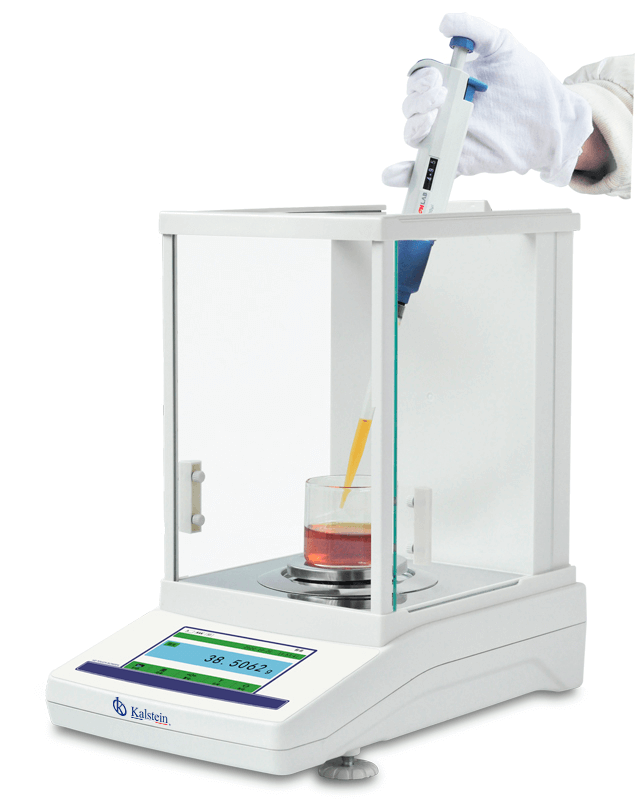
Internal Calibration Analytical Balance YR05573: Installation and Commissioning Guide 2026
The Internal Calibration Analytical Balance YR05573 is designed for high precision weighing applications in various fields, including scientific research, pharmaceuticals, and jewelry. This guide focuses on the installation and commissioning process, ensuring that users can set up the device correctly for accurate results.
Understanding the YR05573 Analytical Balance
The YR05573 analytical balance operates based on electromagnetic force compensation, providing exceptional accuracy with a readability of 0.0001g. It features a large 5-inch touch panel, allowing users to navigate through its functionalities seamlessly. The device includes automatic internal calibration, which ensures consistent performance over time.
Technical Specifications of the YR05573
| Model | YR05573 (current) | YR05574 | YR05575 |
|---|---|---|---|
| Capacity | 100 grams | 200 grams | 220 grams |
| Readability | 0.0001g | ||
| Minimum Weighing | 0.0004g | ||
| Repeatability | ±0.0002g | ||
| Linearity | ±0.0003g | ||
| Stabilization Time | ≤3S | ||
| Bowl Size | Ø80mm | ||
| Appearance Size | 340x215x350mm | ||
| Windshield Size | 240x190x265mm | ||
| Communication | RS232 (standard)/ USB (optional) | ||
| Operating Temperature | 15-35 ℃ | ||
| Calibration | Internal Calibration | ||
| Calibration Weight | 100 grams | ||
| Option | Printer | ||
| Packaging Size | Inner box: 415x285x430mm Outer box: 475x315x485mm | ||
| Gross Weight | 11kg | ||
Unboxing and Initial Setup
When you receive your YR05573 balance, carefully unbox the equipment. The following checklist will guide you through the initial setup:
- Unpack the balance and the accessories.
- Inspect for any visible damage.
- Identify and place the balance on a sturdy, level surface.
- Connect the power supply to the balance and plug it into an appropriate electrical outlet.
Ensure that the area is free from vibrations and drafts to maintain accuracy during operation.
Leveling the Balance
Accurate weighing depends largely on the balance being level. The YR05573 is equipped with leveling feet and a built-in leveling bubble. Follow these steps:
- Adjust the feet until the leveling bubble is centered.
- Recheck the leveling after placing any additional items on the balance.
Power-Up Sequence and First Calibration
To power up the YR05573, follow these steps:
- Press the power button located on the front panel.
- Wait for the self-test to complete.
- Once powered up, navigate to the calibration menu on the display.
- Follow the prompts to perform the internal calibration using standardized weights.
Common Setup Issues and Resolutions
Here are some common issues you may encounter during the setup of the YR05573 and how to resolve them:
| Symptoms | Possible Causes | Solutions |
|---|---|---|
| Balance does not power on | Faulty power supply | Check connections, replace power supply if needed |
| Error code E-03 displayed | Calibration error | Recalibrate using the correct weights |
| Inconsistent readings | Improper leveling | Relevel the balance and ensure stable position |
Frequently Asked Questions
How do I perform internal calibration on the YR05573?
Internal calibration can be performed through the calibration menu on the touch panel. Select the calibration option and follow the prompts to use appropriate calibration weights.
What is the maximum capacity of the YR05573?
The maximum capacity of the YR05573 is 100 grams, making it suitable for various laboratory applications.
What should I do if the balance shows an overload alarm?
If an overload alarm appears, remove excess weight from the balance immediately. Allow the balance to reset before attempting to use it again.
Is there a printer option available for the YR05573?
Yes, the YR05573 offers an optional printer that can be connected via USB for easy data recording and reporting.
What environmental conditions are ideal for the YR05573?
The balance operates best within a temperature range of 15-35°C and should be placed in a draft-free environment to prevent measurement errors.
Can I use the YR05573 for weighing liquids?
Yes, the YR05573 can be used for weighing liquids, especially when using the appropriate containers to prevent spills and ensure accurate measurements.
How often should the YR05573 be calibrated?
It is recommended to perform internal calibration before each use or whenever there is a change in temperature or after moving the balance.
If you are looking for a fusion of innovation and quality, you have come to the right place. At Kalstein, we offer you the luxury of exploring our exclusive catalog of laboratory equipment. We manufacture every device to the highest standards of excellence. Our intuitive and seamless online purchasing channels are designed for your convenience, securing the most competitive prices. Hesitate no longer — we bring science to life, it is time to become part of our community.