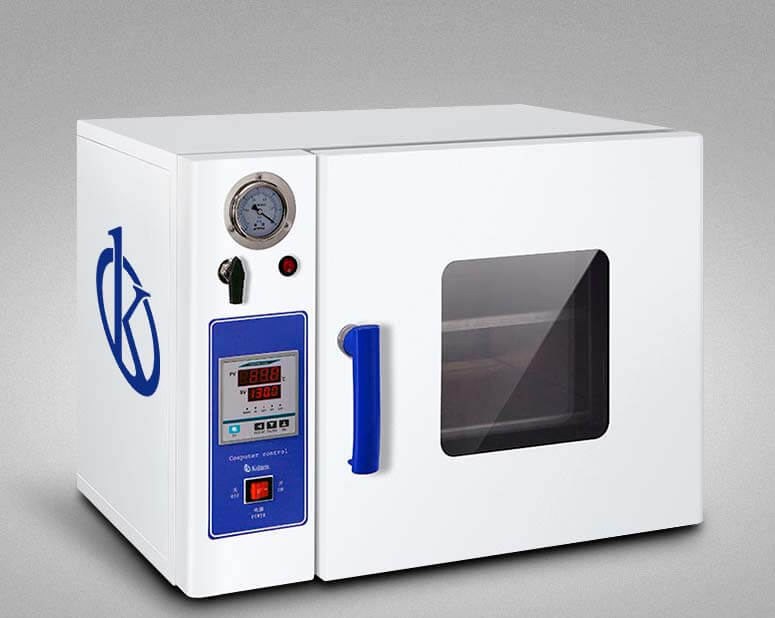
Installation and Commissioning Guide for the YR05264-A Vacuum Drying Oven
The YR05264-A Vacuum Drying Oven is a versatile and efficient piece of laboratory equipment, widely used in various scientific fields including biochemistry, pharmaceuticals, and environmental research. This guide aims to provide a detailed overview of the installation and commissioning process for the YR05264-A, ensuring that users can maximize the oven's capabilities from the very first use.
Understanding the YR05264-A Vacuum Drying Oven
Before diving into the installation and commissioning process, it is essential to understand the functionalities and key features of the YR05264-A. This vacuum drying oven is specifically designed for drying heat-sensitive materials that can easily decompose. The vacuum environment significantly reduces the boiling point of liquids, allowing for efficient and rapid drying.
Technical Specifications of YR05264-A
| Specification | Details |
|---|---|
| Model | YR05264-A |
| Supply Voltage | 220V |
| Temperature Range (°C) | RT + 5 ~ 250 |
| Timer Range | 0 ~ 999 minutes |
| Material | Zinc-coated chamber |
| Temperature Accuracy | ± 1°C |
| Temperature Fluctuation | ± 2% |
| Power (kilowatts) | 0.9 |
| Vacuum Degree | < 133 |
| Internal Size (mm) | 44x48.5x42.5 |
Unboxing and Initial Setup
Upon receiving the YR05264-A Vacuum Drying Oven, the first step is to carefully unbox the device. Ensure to check all components against the included checklist to confirm that nothing is missing. The following items are typically included:
- Vacuum Drying Oven YR05264-A
- Power Cable
- User Manual
- Warranty Card
Once unboxed, place the oven on a stable, flat surface. It is critical to ensure the chosen location is well-ventilated to maintain optimal operating conditions.
Power-Up Sequence and Calibration
After positioning the YR05264-A appropriately, plug the power cable into a suitable power source. Follow these steps to power up and calibrate the oven:
- Ensure that all connections are secure and the door is properly closed.
- Turn on the power switch located on the control panel.
- Set the desired temperature using the digital control interface.
- Allow the oven to reach the set temperature, which may require some time for the vacuum to stabilize.
- Run a test cycle to verify that the oven operates as expected; ensure to monitor the temperature readings closely.
Calibration may involve adjusting the settings based on the readings obtained during the test cycle. This ensures accuracy and reliability in performance.
Common Setup Mistakes to Avoid
During the installation and commissioning of the YR05264-A, certain mistakes can compromise functionality. Here are some common pitfalls to avoid:
- Not checking the power supply specifications, potentially leading to electrical issues.
- Improper placement of the oven, which could restrict airflow and lead to overheating.
- Neglecting to perform an initial calibration, resulting in inaccurate temperature control.
- Forgetting to check the vacuum sealing before running tests.
Operational Best Practices
To ensure the longevity and efficiency of the YR05264-A Vacuum Drying Oven, follow these operational best practices:
- Regularly clean the interior and exterior surfaces to prevent contamination.
- Monitor and record temperature and vacuum levels during each drying cycle.
- Conduct periodic maintenance checks as recommended in the user manual.
- Utilize appropriate materials for drying to avoid damage to the oven.
Frequently Asked Questions
What types of materials can be dried using the YR05264-A Vacuum Drying Oven?
The YR05264-A is ideal for drying heat-sensitive materials, powders, and complex compounds that may easily oxidize or decompose. Its vacuum environment facilitates effective drying without compromising material integrity.
How do I troubleshoot if the oven does not power on?
If the YR05264-A does not power on, check the following:
- Ensure the power cable is securely connected.
- Verify that the power outlet is functioning correctly.
- Inspect the fuse or circuit breaker for any issues.
What maintenance is required for the YR05264-A?
Regular maintenance for the YR05264-A includes cleaning the interior, checking vacuum seals, and calibrating temperature settings periodically to ensure optimal performance.
How can I optimize the drying process using the YR05264-A?
To optimize the drying process, ensure materials are evenly distributed within the chamber, maintain proper vacuum levels, and select appropriate temperature settings based on the specific materials being processed.
What safety measures should be observed when using the YR05264-A?
Always ensure that the vacuum seals are intact before operating the oven. Avoid placing flammable materials inside and be cautious when opening the door to prevent exposure to high temperatures.
Is there a warranty for the YR05264-A Vacuum Drying Oven?
Yes, the YR05264-A is typically backed by a warranty that covers defects in materials and workmanship. Refer to the warranty card included with the device for specific terms and conditions.
If you are looking for a fusion of innovation and quality, you have come to the right place. At Kalstein, we offer you the luxury of exploring our exclusive catalog of laboratory equipment. We manufacture every device to the highest standards of excellence. Our intuitive and seamless online purchasing channels are designed for your convenience, securing the most competitive prices. Hesitate no longer — we bring science to life, it is time to become part of our community.